IP Addresses in AWS
Core Idea
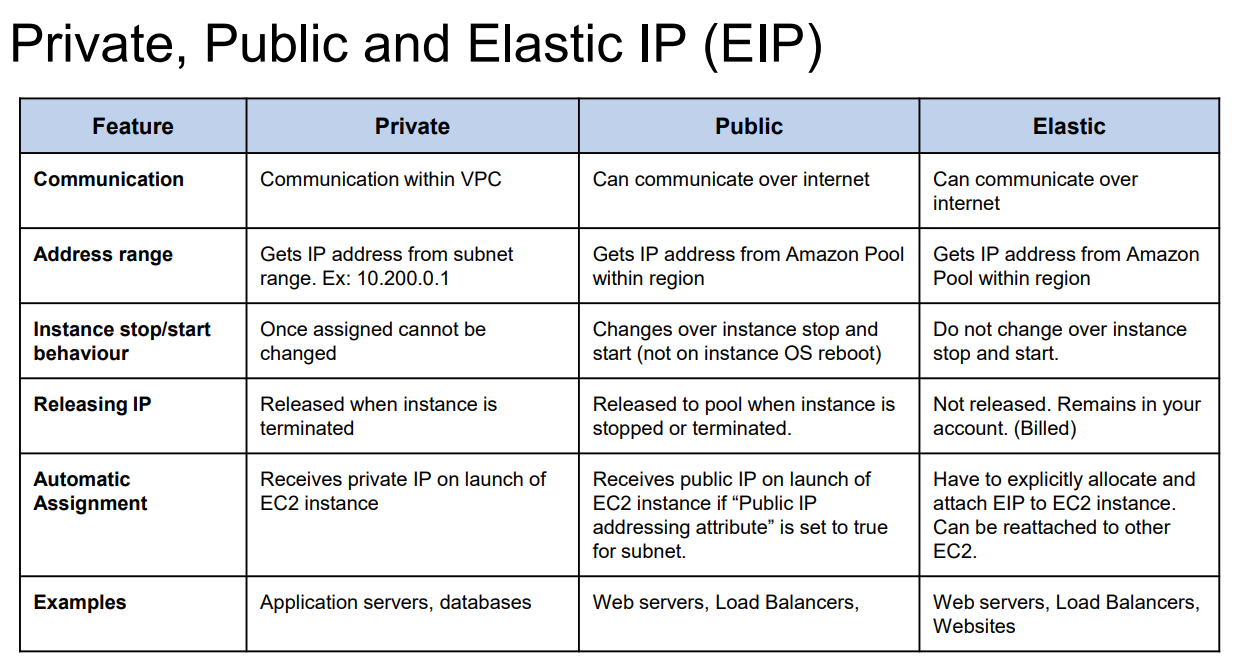
Every EC2 instance always has a Private IP. A Public IP is optional and is assigned only if the instance needs direct Internet access.
🏠 Private IP
Definition
A Private IP is used for communication inside a private network (VPC/LAN). It is not routable over the Internet.
RFC 1918 Private IP Ranges
10.0.0.0     - 10.255.255.255      (10.0.0.0/8)
172.16.0.0   - 172.31.255.255      (172.16.0.0/12)
192.168.0.0  - 192.168.255.255     (192.168.0.0/16)
Characteristics
- Used for internal communication
- Cannot be accessed directly from the Internet
- Assigned to every EC2 instance
- Free and reusable across different private networks
Example
10.0.1.15🌍 Public IP
Definition
A Public IP is globally unique and reachable from the Internet.
It is assigned only when a resource needs direct Internet communication.
Characteristics
- Internet accessible
- Assigned by ISP or Cloud Provider
- Can be Static (Elastic IP) or Dynamic
- Optional for EC2 instances
Example
52.14.22.101Every EC2 Instance
An EC2 instance always has a Private IP. A Public IP is simply an additional address.
EC2 Instance
Private IP : 10.0.1.25   ✅ Always
Public IP  : 52.14.22.101 (Optional)
Private IP is the primary identity of an EC2 instance inside the VPC.
Public Subnet vs Private Subnet
Many people think:
Public Subnet = Public IPs
This is incorrect. A subnet is classified based on its route table, not by the IP addresses of instances.
Public Subnet
A subnet is public if its route table contains:
0.0.0.0/0 → Internet Gateway (IGW)Resources can access the Internet only if they also have a Public IP.
Private Subnet
A subnet is private if it does not have a route to an Internet Gateway. Outbound Internet access (if needed) is provided through a NAT Gateway.
Internet Connectivity
flowchart LR

Internet --> IGW

IGW --> PublicSubnet["Public Subnet"]

PublicSubnet --> EC2["EC2

Private IP ✅
Public IP ✅"]
flowchart LR

Internet --> IGW

IGW --> NAT["NAT Gateway
Elastic IP"]

NAT --> PrivateSubnet["Private Subnet"]

PrivateSubnet --> EC2["EC2

Private IP ✅
No Public IP"]
NAT Gateway
Definition
A NAT Gateway (Network Address Translation Gateway) allows resources in private subnets to access the Internet without exposing them to inbound Internet traffic.
How it Works
- Private EC2 sends request
- Request reaches NAT Gateway
- NAT replaces the Private IP with its Elastic IP
- Internet responds
- NAT forwards the response back to the EC2
Characteristics
- Placed inside a Public Subnet
- Has:
- Private IP
- Elastic IP (Static Public IP)
- Supports Outbound Internet access only
- Blocks unsolicited inbound traffic
Real World Example
Think of a college campus.
- Every laptop has a Private IP
- The college has one Public IP
- The router performs NAT
flowchart LR

Laptop1["10.0.0.5"]
Laptop2["10.0.0.6"]
Laptop3["10.0.0.7"]

Router["College Router
Public IP: 49.36.124.78"]

Internet

Laptop1 --> Router
Laptop2 --> Router
Laptop3 --> Router

Router --> Internet
The Internet only sees: 49.36.124.78 never see 10.0.0.x
Comparison
| Feature | Private IP | Public IP |
|---|---|---|
| Internet Accessible | ❌ No | ✅ Yes |
| Globally Unique | ❌ No | ✅ Yes |
| Used For | Internal Communication | External Communication |
| Assigned To | Every EC2 | Only when needed |
| Cost | Free | May incur charges |
| Example | 10.0.1.25 | 52.14.22.101 |
Public vs Private Subnet
| Public Subnet | Private Subnet |
|---|---|
| Route to Internet Gateway | No Route to Internet Gateway |
| Instances usually have Public IP | Instances usually don’t have Public IP |
| Can receive Internet traffic | Cannot receive Internet traffic directly |
| Used for ALB, Bastion Host, NAT Gateway | Used for App Servers, Databases, Internal Services |
Interview Notes
A Public Subnet does not mean every instance has a Public IP.
Every EC2 instance always has a Private IP.
A Public IP is an additional IP attached only when direct Internet access is required.
Subnets are classified by their Route Tables, not by the IP addresses of the instances inside them.